
AAAnow, 25 years of innovation

Diagnostics

What AI reads on each page,
and what to change.

For the web, content and technical teams who make the corrections: the result for a single document or address, the evidence behind it as it was delivered, and the steps to fix it where they can be set out. The examples below are taken from real readings.

ReferencePLT/2026/12
Updated28 Oct. 2026

01Each result can be checked against the page itself.

A reading records how AI is likely to read a page or document on the day it is visited: what came back when it was asked for, what it says about itself, and how each check came out. The evidence is kept with each result, taken from the page as it was delivered, so your team can open the page and see the same thing. In WORK|PACK, results across the estate are set in order of priority; Diagnostics is the detail behind each one.

02Start from what AI was actually given.

Before any check, the reading shows what came back when the page or document was asked for, and what it says about itself. Often, that is where the problem starts.

The page

A page that never says when it was written.

Served in full in 93 milliseconds, with a title and description. Nothing on the page states a date, so AI cannot tell whether it is current or years old.

Look for Last changed: Nothing on the page says.
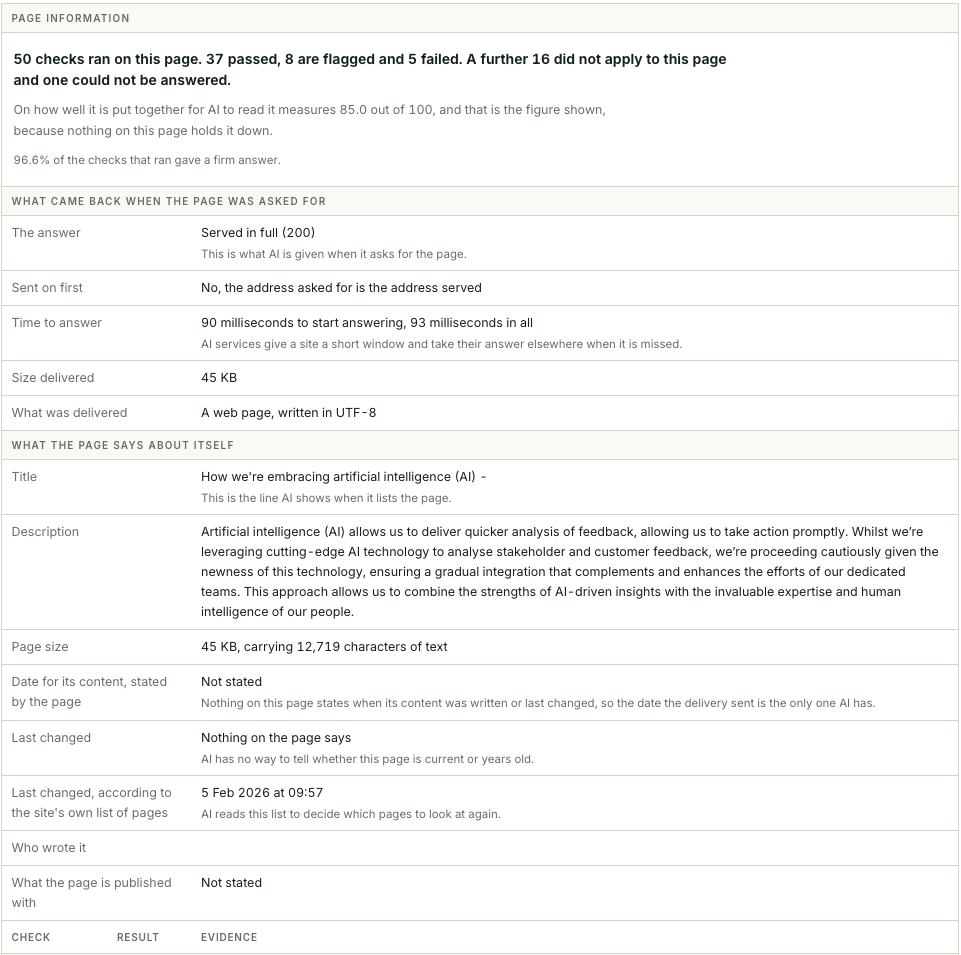
Page information for a web page, where 50 checks ran: 37 passed, 8 are flagged and 5 failed, with a further 16 not applying and 1 that could not be answered. It measures 85.0 out of 100 for how well it is put together for AI to read. What came back: served in full (200), no redirect, 90 milliseconds to start answering, 45 KB, a web page in UTF-8. What the page says about itself: its title and description; no date stated for its content; nothing on the page says when it was last changed; the site’s own list of pages gives 5 Feb. 2026; no author; the publishing system not stated.

The document

A well-made document AI never reaches.

Built well enough to measure 66.0 out of 100, it counts for 9.9, because AI is turned away before it reaches the file.

An example - this is made up for th purpose of illustration.

Underlined in red: AI is turned away before it reaches this document.
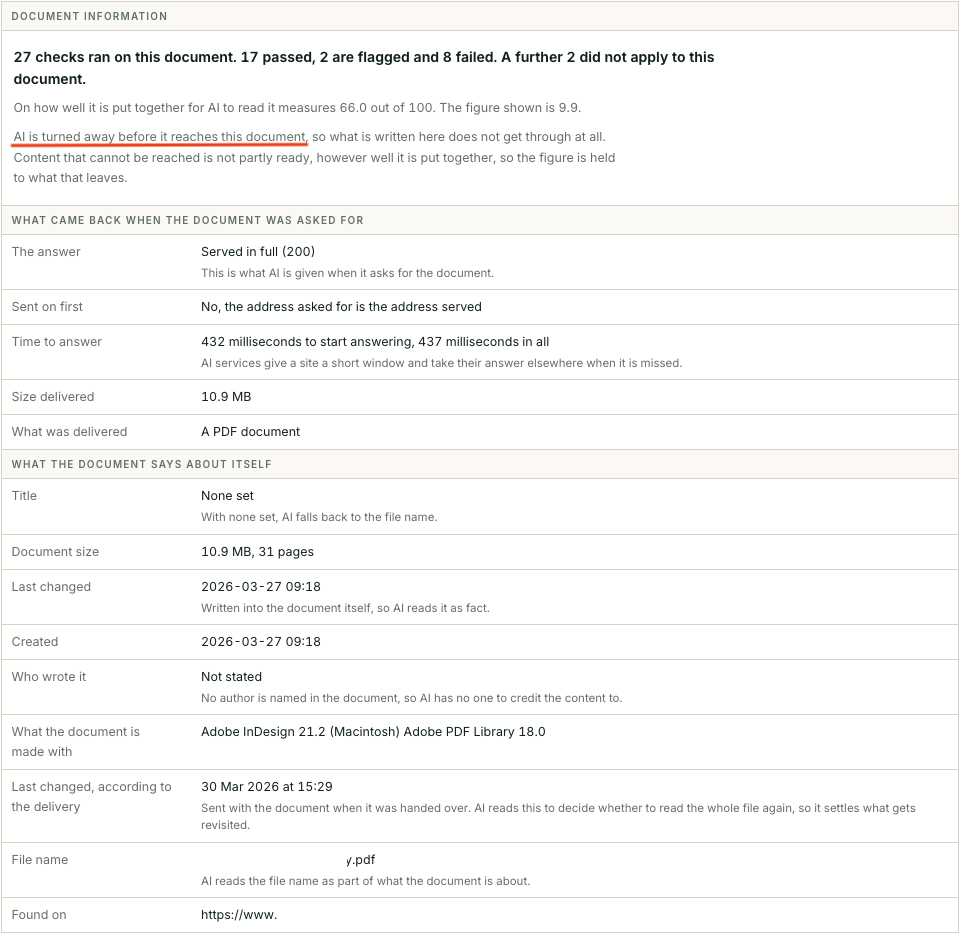
Document information for a 31-page PDF of 10.9 MB, where 27 checks ran: 17 passed, 2 are flagged and 8 failed, with a further 2 not applying. It measures 66.0 out of 100 for how well it is put together for AI to read, but the figure shown is 9.9, because AI is turned away before it reaches the document, a line marked in red. What the document says about itself: no title set, so AI falls back to the file name; no author stated; created and last changed 27 Mar. 2026; made with Adobe InDesign 21.2.

03Each result points to the exact item.

Each check states what it looks for, what good looks like, why it matters for AI, what it found and what to do, then lists the items behind the result.

The wording

A question in the page’s headings with no answer under it.

Of the 9 questions the page asks in its own headings, 1 has nothing written beneath it. AI picks up the question and repeats it; the answer is not there to go with it.

Boxed in red: Accessibility help?
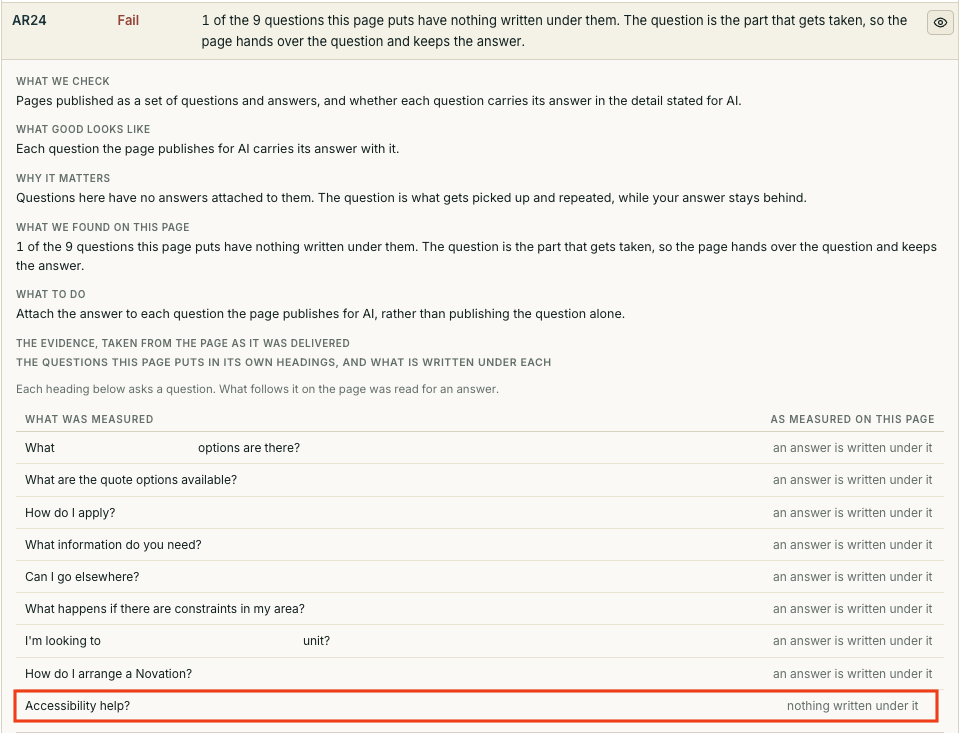
Check AR24, result Fail: 1 of the 9 questions this page puts in its own headings has nothing written under it. The check sets out what is checked, what good looks like, why it matters, what was found and what to do: attach the answer to each question the page publishes for AI. The evidence lists the 9 questions; 8 have an answer written under them and 1, Accessibility help?, marked in red, has nothing written under it.

The links

Links that answer with an error.

Of the 120 addresses linked from these pages, 10 return an error. Whatever those pages said is missing from what AI knows of you.

Look for 404, Not there.
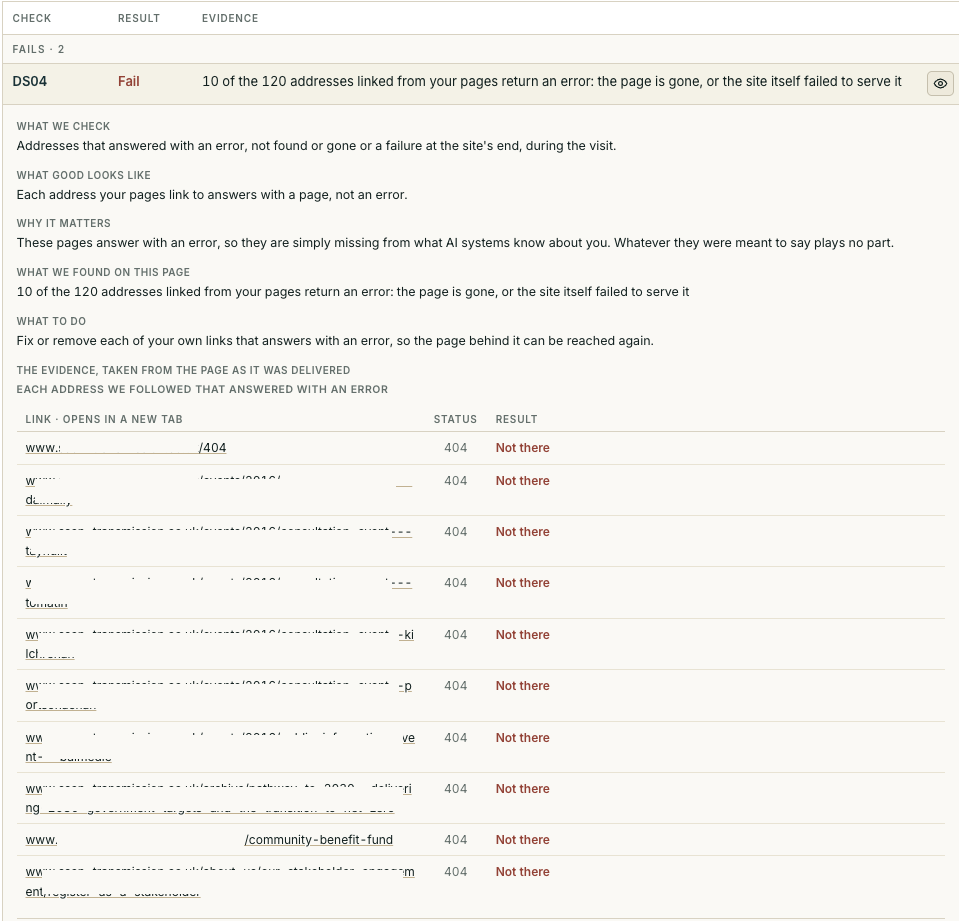
Check DS04, result Fail: 10 of the 120 addresses linked from the pages return an error, because the page is gone or the site failed to serve it. The check sets out what good looks like, why it matters and what to do: fix or remove each link that answers with an error. The evidence lists the 10 addresses, each returning status 404, not there.

The document’s text

Words that come out jumbled.

In 10 lines of this document the letters run together, so what AI reads from it is garbled rather than its actual words. Broken sentences get quoted as though they were what you wrote, with your name on them.

Look for The text, first 500 characters: the table of contents with its words run together.
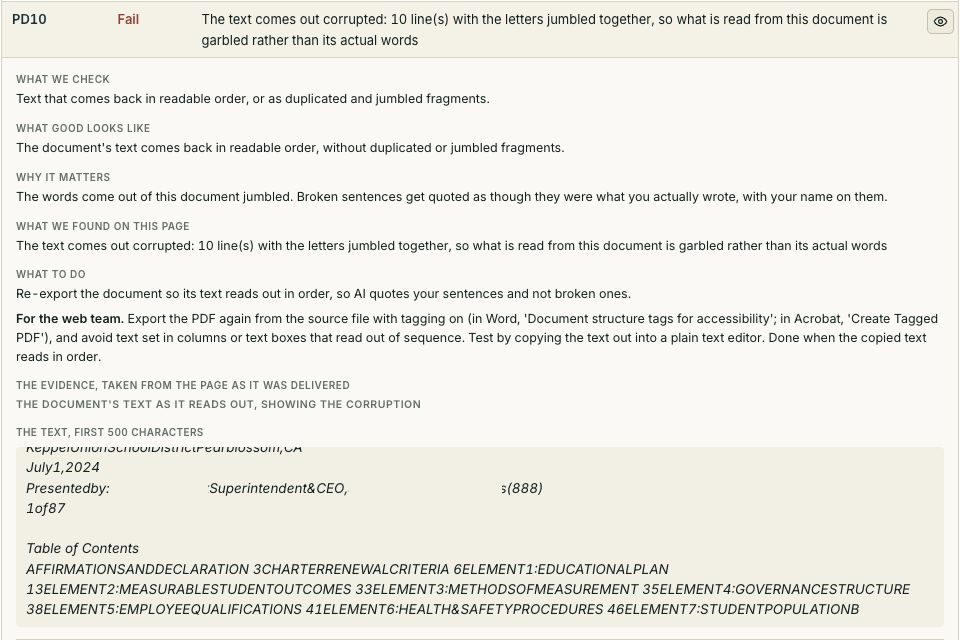
Check PD10, result Fail: the text comes out corrupted, 10 lines with the letters jumbled together, so what is read from this document is garbled rather than its actual words. The check sets out what we check, what good looks like, why it matters, what we found and what to do: re-export the document so its text reads out in order, with steps for the web team on tagging and text set in columns or text boxes. The evidence shows the document’s text as it reads out, the first 500 characters, with a table of contents whose words run together without spaces.

Nothing is perfect, and no reading is. Each result is what AI thinks and is seeing on the day of the visit; where your team finds the page says otherwise, the evidence is there to raise it with us.

04Where a fix can be written down, the steps come with it.

Help for the web team

The steps, written for the person who makes the change.

This PDF has no title in its own properties, so AI knows it by its file name. The result says what to do, then gives the web team the steps: where to go, what to set, and how to tell it is done.

Outlined in teal: the steps for the web team.

Arrowed in red: no title and no author recorded.
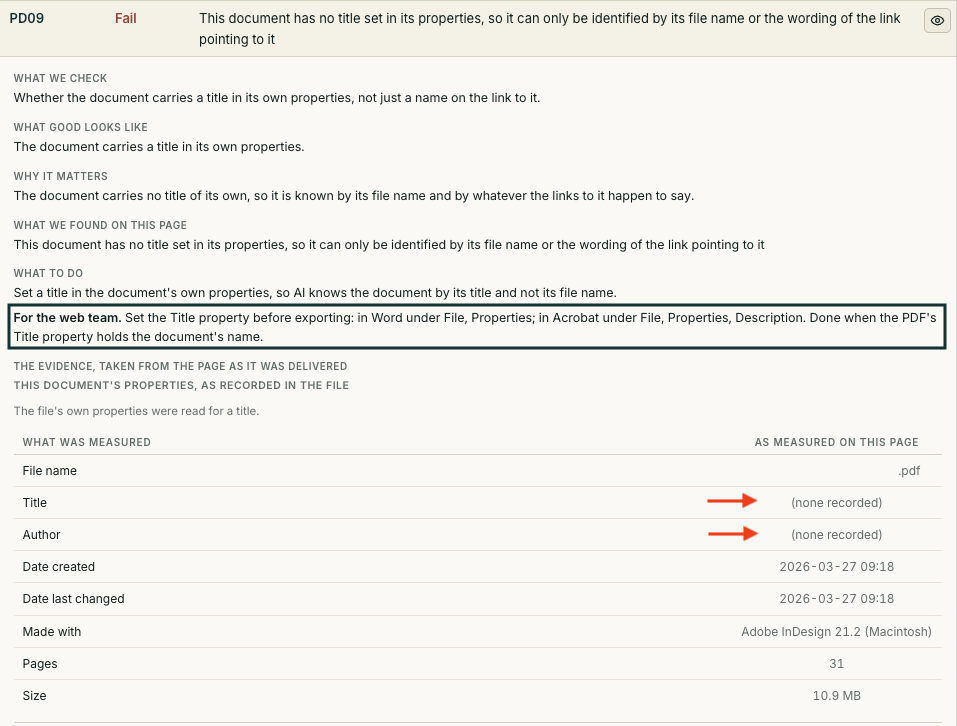
Check PD09, result Fail: the document has no title set in its properties, so it can only be identified by its file name or the wording of the link pointing to it. A teal panel headed For the web team sets out the fix: set the Title property before exporting, in Word under File, Properties, and in Acrobat under File, Properties, Description; done when the PDF’s Title property holds the document’s name. The evidence shows the properties recorded in the file, with no title and no author recorded, both marked in red.

Where a fix depends on your own systems, the result states what to change and the evidence to work from, and we work through it with your team.

05When the change is made, it is read again.

The page or document is read again after the change. The result moves when AI is given something different, so the record shows what was found, what was changed and the reading that confirms AI now has it. For directors and officers, it is the record that the exposure was found and dealt with. Each correction changes what AI is given to read; WORK|PACK sets the order of the work.